
Selecting Fiber Site Backup Power requires more than comparing battery capacity and purchase prices. A reliable solution must protect network continuity during outages, voltage fluctuations, and difficult weather. Fiber cabinets often serve remote roads, industrial zones, and rural communities. Access may be limited when the power fails.
The right choice begins with actual site conditions. Measure equipment load, starting current, required runtime, cabinet space, and local temperature ranges. Then compare lithium-ion, lead-acid, hybrid, and generator-supported systems. Each option has practical strengths. Each also has limitations. Lithium batteries can reduce maintenance, but poor thermal control may shorten their service life. Lead-acid systems remain familiar, yet they require more space and regular inspection.
Experienced technicians also examine charging efficiency, surge protection, remote monitoring, and replacement access. A battery that looks adequate on paper may fail after years of heat exposure and repeated deep discharge. That mistake is common. It deserves attention.
Reliable planning uses manufacturer datasheets, measured field data, and conservative backup calculations. Monitoring should report voltage, temperature, battery health, and remaining runtime. These details help operators respond before an outage becomes a service interruption. Industry experience shows that maintenance access can matter as much as battery chemistry. A perfect design is unrealistic. Conditions change, and early assumptions may be wrong. Review the plan after installation, seasonal testing, and major network upgrades. The best solution balances resilience, safety, operating cost, and practical maintenance.
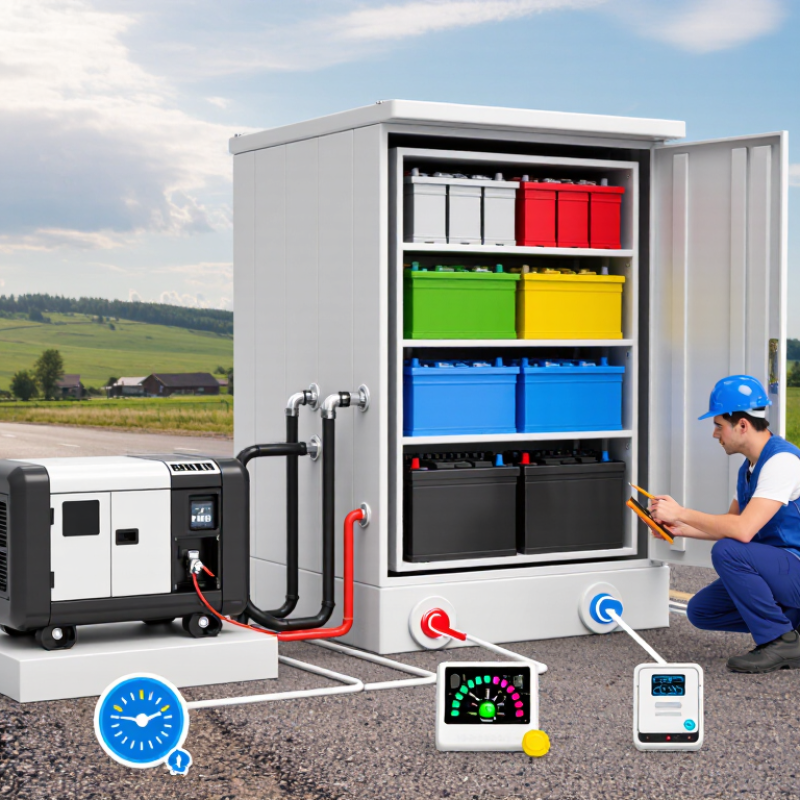
At a fiber site, backup power planning starts with the actual load, not a catalog rating. Record peak and steady consumption from optical terminals, switches, cooling fans, security devices, and lighting. Small loads accumulate. Measure them during busy and quiet periods. A two-hour battery may fail when temperatures fall, batteries age, or new equipment is added. Site surveys also reveal weak points, such as corroded terminals, limited ventilation, or difficult winter access.
Define required autonomy in hours, then compare it with outage history and restoration times for that location. Critical sites may need battery storage, a generator connection, or both. Use verified voltage, current, and temperature data when sizing rectifiers and batteries. Include starting currents and future capacity, but avoid excessive oversizing. It increases cost and may leave batteries underused. Battery chemistry, enclosure rating, fire protection, and local electrical requirements require careful review. Remote monitoring should report voltage, temperature, alarms, and remaining capacity before service is lost.
In field assessments, I have found that maintenance assumptions are often too optimistic. A monthly inspection can miss a loose connection that heats under load. Test the system under realistic conditions, not only during a dashboard check. Keep test records, replacement dates, and access instructions where technicians can use them. A spreadsheet can still be wrong. During a storm, clear access may matter as much as stored energy.
How to Choose Fiber Site Backup Power Solutions?
Assessing Equipment Loads, Runtime, and Site Conditions
A reliable backup plan starts with an accurate equipment load assessment. List every fiber device, switch, router, cooling fan, monitoring unit, and alarm circuit. Do not trust nameplate ratings alone. Measure actual power use during busy and quiet periods. I have seen small cooling fans create surprising demand in sealed cabinets. Peak startup current also matters. My first estimate was too optimistic because I ignored battery charger losses and future equipment additions.
Runtime should match the site’s operational risk, not a convenient round number. Calculate the required hours, then include conversion losses, battery aging, and cold-weather performance. A three-hour target may deliver less after several years. Review outage records and maintenance access before selecting capacity. Remote sites need more reserve when technicians require long travel times. Site conditions can change the answer quickly. Check cabinet temperature, ventilation, humidity, dust, flooding exposure, elevation, and available floor space. Poor ventilation may reduce battery life. Limited access can make heavy replacement work difficult.
Tips: Record real load data for at least one full operating cycle. Add a practical growth margin, but avoid excessive oversizing. Test alarms and automatic transfer functions under controlled conditions. Recheck runtime after installation. Small assumptions become expensive later. Document every measurement, including temperature and battery age. Revisit the design annually, because network traffic, cooling demand, and site conditions rarely remain fixed.
| Site Equipment | Typical Load | Peak Load Allowance | Recommended Backup Capacity | Target Runtime | Indicative Battery Energy | Suitable Power Architecture | Selection Considerations |
|---|---|---|---|---|---|---|---|
| Passive Fiber Distribution Point | 0–20 W | Minimal; mainly environmental equipment | 300–500 VA UPS or DC backup unit | 8–24 hours | Approximately 0.3–0.8 kWh | Compact DC system or small AC UPS | Prioritize low standby consumption, outdoor enclosure protection, and sufficient capacity for monitoring devices. |
| Fiber Access Node | 80–180 W | 250–350 W during startup or module expansion | 1–1.5 kVA UPS or 500–800 W DC system | 4–8 hours | Approximately 0.6–1.8 kWh | Online UPS or -48 V DC backup system | Verify the node's input voltage, rectifier efficiency, ventilation requirements, and acceptable transfer time. |
| Optical Line Terminal (OLT) | 250–700 W | 800–1,000 W with uplink and service modules | 2–3 kVA UPS or 1–1.5 kW DC system | 2–6 hours | Approximately 1.0–4.5 kWh | Online UPS with external battery cabinet or modular DC plant | Calculate the load using the fully populated chassis rather than the initial configuration. Include uplink optics and control modules. |
| Ethernet Aggregation Switch | 100–350 W | 450–600 W with Power over Ethernet (PoE) | 1.5–3 kVA UPS | 2–4 hours | Approximately 0.6–2.0 kWh | Online UPS with network monitoring | PoE power can substantially increase demand. Use measured maximum traffic and PoE utilization when sizing the battery. |
| Radio or Wireless Backhaul Unit | 150–600 W | 700–900 W during transmission peaks | 2–3 kVA UPS or 1–1.5 kW DC system | 4–12 hours | Approximately 1.2–7.5 kWh | DC backup system or online UPS with generator interface | Consider transmitter duty cycle, antenna heating, cold-start behavior, and the additional load from outdoor radio equipment. |
| Security, Access, and Environmental Monitoring | 30–150 W | 200–350 W when heaters or illuminators operate | 500 VA–1 kVA UPS | 8–24 hours | Approximately 0.4–3.6 kWh | Small UPS or dedicated low-voltage DC backup | Outdoor cameras, heaters, door locks, fans, and sensors may have intermittent high-current loads that should be included. |
| Cooling and Ventilation | 300–1,500 W | Up to 2,500 W during compressor startup | 3–6 kVA UPS only where cooling continuity is essential | 1–4 hours | Approximately 0.8–6.5 kWh | High-capacity UPS, controlled load shedding, or generator-supported system | Motor starting current can exceed the running load. Confirm the UPS surge rating and consider maintaining telecom loads before cooling loads. |
| Complete Fiber Shelter or Cabinet | 800–2,500 W | 3,000–4,000 W depending on cooling and expansion | 5–10 kVA UPS or modular DC power system | 2–8 hours | Approximately 2.0–20 kWh | Modular online UPS, DC plant, or UPS plus standby generator | Use a detailed load inventory, include future growth of 20–30%, and design separate priority circuits for critical network equipment. |
| Site Condition | Typical Risk | Recommended Battery or Enclosure Approach | Design Adjustment | Practical Selection Guidance |
|---|---|---|---|---|
| Indoor, Temperature-Controlled Room | Low temperature variation and limited dust | Valve-regulated lead-acid or lithium-based battery system in a ventilated cabinet | Use the calculated load with a 20% design margin | Confirm available floor space, electrical grounding, battery ventilation, maintenance access, and fire-protection requirements. |
| Outdoor Cabinet | Heat, moisture, dust, condensation, and restricted airflow | Temperature-rated battery cabinet with environmental monitoring and suitable ingress protection | Apply temperature derating and verify the enclosure's thermal design | High temperatures accelerate battery aging. Consider thermal insulation, active ventilation, cabinet heating, and condensation control. |
| Remote Solar-Powered Site | Limited grid availability and variable solar energy | Deep-cycle battery bank with solar charge controller and DC distribution | Size for the required autonomy period plus low-solar conditions | Use local solar irradiation data, account for seasonal variation, include charge losses, and set conservative low-voltage disconnect limits. |
| High-Altitude or Cold Site | Reduced battery performance and low-temperature charging restrictions | Battery system rated for the minimum ambient temperature with cabinet heating where necessary | Increase capacity to offset low-temperature derating | Verify the permitted charging temperature, altitude derating of power electronics, insulation, and reduced cooling effectiveness at altitude. |
| High-Temperature Site | Shortened battery service life and increased cooling demand | Temperature-compensated charging system and heat-managed battery enclosure | Use additional capacity or shorter replacement intervals | Keep batteries away from hot power electronics where possible. Monitor battery temperature and plan preventive replacement based on actual conditions. |
| Flood-Prone or Coastal Location | Water ingress, salt corrosion, and grounding hazards | Raised, sealed, corrosion-resistant enclosure with protected cable entries | Add environmental protection and drainage provisions | Use corrosion-resistant hardware, surge protection, proper bonding, and installation height above the expected flood level. |
| Unstable Grid or Frequent Outages | Repeated transfer events, voltage variation, and deep battery cycling | Online UPS or DC system with automatic transfer, event logging, and generator compatibility | Size for the longest expected outage and recharge time | Check input voltage range, transfer requirements, recharge current, battery cycle life, and whether a generator can support the recharge load. |
Choosing fiber site backup power starts with the site’s failure pattern, not the equipment catalog. Batteries deliver instant, silent protection for short outages. They suit cabinets near homes, roads, or noise-sensitive areas. The Uptime Institute’s 2024 Annual Outage Analysis identifies power problems as the leading cause of serious outages. That finding supports fast battery response, especially during unstable grid transfers.
Generators remain useful when outages last many hours. They provide higher energy capacity, but fuel storage, servicing, ventilation, and environmental controls add operational pressure. A remote fiber hut may have enough battery space, yet no safe refueling access. That detail changes the decision. Generators also need regular testing. Neglected equipment can fail when the weather is worst.
Hybrid systems combine batteries with a generator and intelligent controls. The battery handles the first minutes, while the generator starts under a lighter load. This can reduce fuel use and generator cycling. The IEA’s 2024 Batteries and Secure Energy Transitions report says global energy storage capacity must increase sixfold by 2030 in its net-zero scenario. The direction is clear, but the local economics are less certain. Battery replacement costs, cold-weather performance, and recycling plans deserve honest attention. A hybrid design can look perfect on paper. It may still be excessive for a low-load site with brief interruptions. Conversely, a battery-only system may become risky during a three-day storm. Pilot testing with real site load data is often wiser than trusting nameplate ratings.
How to Choose Fiber Site Backup Power Solutions?
Choosing Capacity, Monitoring, and Protection Features
At a fiber site, backup power should start with measured demand, not a catalogue rating. List rectifiers, optical equipment, cooling fans, security devices, and future expansion. Record watts, inrush current, and required voltage. Then apply an aging and temperature margin. Oversizing wastes capital, but undersizing shortens autonomy during peak traffic.
The IEA’s Electricity 2024 report estimates that data centers consumed 460 TWh globally in 2022. It also expects demand to exceed 1,000 TWh by 2026. Fiber shelters are smaller, yet the lesson remains clear: efficiency and load visibility matter. Measure twice. Autonomy should match the site’s restoration reality. A remote cabinet may need several hours, while an urban node may need less. Use the worst seasonal battery temperature, not the room’s average.
Uptime Institute’s 2024 Annual Outage Analysis found that 54% of reported outages cost more than $100,000. These figures focus on data centers, not fiber sites. Still, they show why cheap backup assumptions deserve scrutiny. Monitoring should expose battery voltage, current, temperature, charge status, runtime, and charger faults. Send alarms through two independent paths when possible. Protection requires surge suppression, short-circuit coordination, reverse-polarity safeguards, grounding, and controlled shutdown. Field conditions are rarely neat. Dust, heat, and weak maintenance records can defeat a perfect design. Recheck capacity after traffic growth, because the first forecast is often wrong.
Compare nominal battery capacity with the estimated backup runtime for typical fiber-site loads. The calculation assumes 85% usable energy after conversion losses and battery reserve.
Select capacity according to the measured load, required autonomy, battery aging, and expected temperature range.
Prefer systems that report voltage, current, state of charge, temperature, runtime estimate, and alarms remotely.
Look for over-voltage, under-voltage, overload, short-circuit, over-temperature, surge, and low-voltage disconnect protection.
Planning model: usable AC energy equals nominal battery capacity × 85%. Runtime is calculated as usable energy ÷ site load. Actual results vary with battery chemistry, inverter efficiency, temperature, aging, and load variation.
A reliable fiber backup system starts with an honest site survey. Record equipment loads, starting currents, battery age, room temperature, and expected outage duration. Leave at least 25% spare capacity for future devices. This space matters.
During installation, place batteries away from heat, water, and direct sunlight. Provide clear access for inspection and safe replacement. Confirm grounding, cable sizing, ventilation, and transfer switching against local electrical requirements. Label every cable at both ends. A neat cabinet saves time during an emergency. I have seen well-designed systems fail because one undocumented connection confused the maintenance team.
Maintenance should be practical and scheduled. Check alarms, terminals, battery swelling, corrosion, and unusual heat each month. Test backup runtime under controlled conditions at least annually. Keep voltage readings, inspection dates, and replacement decisions in one service record. Do not rely only on remote monitoring. Sensors can fail. A technician should still inspect the cabinet.
Expansion planning deserves equal attention. Reserve rack space, cable pathways, breaker capacity, and cooling capacity before adding loads. Modular battery cabinets can simplify growth, but only when their protection settings match the existing system. Review the design after every major equipment upgrade. My own planning can be too optimistic when traffic forecasts change quickly, so I now question every assumption and verify actual load data before approving expansion.
Start with measured demand, not catalog ratings. Record steady loads and peak loads from optical equipment, switches, fans, security devices, and lighting. Include starting currents, battery aging, temperature, and future expansion. Small loads add up.
Define autonomy in hours. Compare it with local outage history and repair times. A remote cabinet may need several hours. An urban site may need less. The estimate can be wrong, so review it after major outages.
Cold temperatures can reduce available battery capacity. Aging batteries may deliver less runtime than expected. Use the worst seasonal temperature during sizing. Do not rely on the room’s average temperature.
Monitoring should report voltage, current, temperature, charge status, remaining capacity, runtime, and charger faults. Send alarms through two independent communication paths when possible. Sensors can fail.
Use surge suppression, short-circuit coordination, reverse-polarity protection, proper grounding, and controlled shutdown. Check cable sizing and transfer switching against local electrical requirements. Protection settings must match the installed equipment.
Keep batteries away from heat, water, and direct sunlight. Provide clear inspection access and safe replacement space. Label every cable at both ends. A neat cabinet helps during storms and urgent repairs.
Check alarms, terminals, swelling, corrosion, and unusual heat monthly. Test backup runtime under controlled conditions at least annually. Keep voltage readings and replacement dates in one service record. Remote monitoring alone is not enough.
Reserve rack space, cable routes, breaker capacity, and cooling capacity before adding equipment. Leave about 25% spare capacity when practical. Recheck actual load after traffic growth. My forecasts can be too optimistic, so I verify the data again.
Choosing the right Fiber Site Backup Power solution begins with understanding the site’s operational priorities and power requirements. Start by assessing the loads of optical network equipment, cooling systems, security devices, and monitoring tools, then estimate the runtime needed during outages. Site conditions such as temperature, humidity, accessibility, grid reliability, and available space should also influence the design. Batteries may provide fast, quiet backup for short interruptions, while generators can support longer outages. Hybrid systems can combine these advantages for improved flexibility and efficiency.
A complete solution should offer sufficient capacity, intelligent monitoring, surge protection, temperature control, and safe automatic switching. Planning should also include installation requirements, ventilation, cable management, routine testing, battery replacement, and emergency maintenance access. By selecting a scalable system, operators can accommodate future equipment additions without major redesigns. A well-planned Fiber Site Backup Power system helps maintain network availability, protect critical equipment, reduce service interruptions, and support reliable long-term site operation.